
This is the actual 25-point checklist we run on every dealership Google Ads account we audit. Print it. Bring it to your next agency meeting. Watch the temperature change.
Why we publish our checklist
No one grades their own homework. The agency that builds the account also reports on the account, and that is a conflict nobody names out loud. A checklist you can read yourself removes the conflict. You can ask the questions, hear the answers, and judge them on your own.
We are fine with you running this dealership Google Ads audit without us. Most dealers who read the whole thing still want it run for them, because reading a question and pulling the real number are two different jobs. But the instrument is public either way. A car dealer SEM checklist that stays hidden is just a sales tool. One you can hold in your hand is a standard.
Every item below is a question. Every question has a place to look. Numbers in this post are illustrative and anonymized, used to show what a healthy or unhealthy answer looks like, not pulled from any specific account.
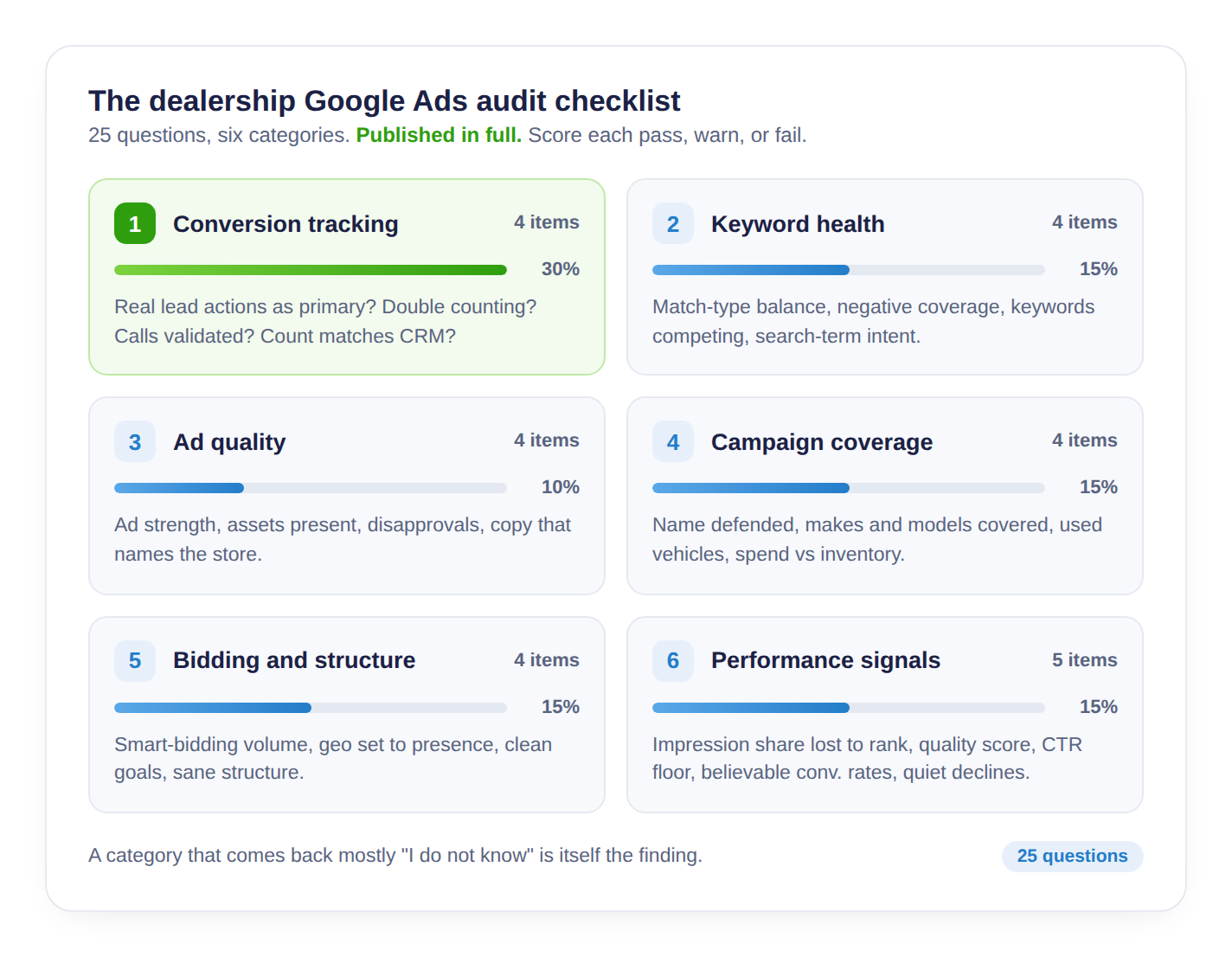
Category 1: Conversion tracking (the foundation)
Everything downstream depends on counting the right things. Get this wrong and every report above it is fiction.
- Are real lead actions the primary conversions? Form submits, click-to-call, and chat starts should be the events that guide bidding. Page views, "viewed inventory," and button clicks that lead nowhere should not. Look in Tools, then Conversions, and check which actions are marked Primary.
- Is anything double counting? One form submission should create one lead conversion. If the same action fires through Google Ads, GA4 import, and a tag manager rule at once, your count inflates. Look at the conversion action list for duplicates measuring the same event.
- Are calls validated or counted raw? A phone number on the site is not a lead conversion until someone stays on the line. Ask whether calls are counted only past a threshold. We treat 60 seconds and up as a qualified call. Look in the call conversion settings for the minimum duration.
- Does the count match your CRM? Pick one month. Compare lead conversions in the account to actual lead records in your CRM. A wide gap in either direction is the finding, and it is worth chasing before you trust anything else.
Category 2: Keyword health
- Is the match-type balance sane? Broad match spends fast and wide. If nearly everything is broad with thin controls around it, the account is buying reach you did not ask for. Look in the Keywords tab, add the Match type column, and see the split.
- Is there real negative keyword coverage? Job seekers, parts-only searches, other cities, and free-anything queries should be filtered out. An empty or tiny negative list means you are paying for clicks that were never in market. Look in Tools, then Negative keyword lists.
- Are your own keywords fighting each other? When two campaigns bid on the same term, you compete against yourself and raise your own cost. Look in the search terms report for the same query pulling clicks across multiple campaigns.
- Do the search terms match the intent you want? The keyword you bought and the query that actually triggered can drift far apart. Read the raw search terms report and see what people typed.
Category 3: Ad quality
- What is the ad strength on your responsive search ads? "Poor" or "Average" across the account signals thin or repetitive copy. Look in each ad group at the Ad strength label.
- Are the assets actually present? Sitelinks, callouts, structured snippets, and call assets should be live at the account or campaign level. Missing assets mean a smaller, weaker ad on the page. Look in the Assets tab.
- Is anything disapproved? A disapproved ad or asset simply does not show. Look for the Disapproved status in the Ads and Assets tabs, and ask how long it has been sitting there.
- Does the ad copy name the dealership and the offer? Generic copy that could belong to any store in the state wastes the click. Read the live ads the way a shopper would.
Category 4: Campaign coverage
- Is your dealership name defended? When someone searches your store by name, your ad should be there. If a third party is bidding on your name and you are not, you can lose your own customer at the door. Look for a brand campaign and check its impression share.
- Are your core makes and models covered? The vehicles that actually sell should have campaigns behind them. Look at the campaign list and match it against your top movers.
- Is used-vehicle coverage real? Used demand is large and often under-served in the account. Look for used or pre-owned campaigns and check whether they get meaningful budget.
- Does spend line up with inventory? If a model you are overstocked on gets almost no spend while a thin line gets most of it, the account and the lot disagree. Compare the spend-by-campaign view against what is sitting on the ground.
Category 5: Bidding and structure
- Does smart bidding have enough volume to learn? Automated bidding needs a steady flow of conversions to work. An account with very few monthly lead conversions on a target-based strategy is guessing. Look at the bid strategy per campaign and the conversion volume feeding it.
- Is geo targeting set to presence, not interest? The default "presence or interest" setting can show your ads to people researching your city from three states away. Look in campaign Settings, Locations, Location options.
- Are campaign goals clean? A campaign optimizing toward a soft event instead of a lead conversion will chase the wrong outcome all day. Look at the goal and conversion settings on each campaign.
- Is the account structured or scrambled? Ad groups stuffed with unrelated keywords make relevance impossible. Skim the structure and see whether the grouping would make sense to a stranger.
Category 6: Performance signals
- How much impression share is lost to rank? "Lost IS (rank)" tells you how often you were eligible but ranked too low to show. A high figure, say 40 percent in an illustrative account, means real demand you never reached. Add the Search Lost IS (rank) column.
- What does quality score distribution look like? A pile of 3s and 4s points at a relevance or landing-page problem. Add the Quality Score column in the Keywords tab.
- Is there a CTR floor problem? Click-through rate well under a normal branded or high-intent range suggests the ad, the offer, or the match is off. Look at CTR by campaign and by ad group.
- Are conversion rates believable by campaign? One campaign at 0 percent and another at an impossible 30 percent usually means a tracking issue, not a marketing miracle. Compare conversion rate across campaigns.
- Is anything trending down quietly? A slow monthly slide in lead conversions rarely shows up in a single report. Look at the trend over the last six months, not just last month.
DIY: check it yourself
That is the whole thing. Twenty-five items, six categories, plain English, and the place in Google Ads to find each answer. This post is the DIY dealership PPC audit checklist. Nothing is held back and nothing is gated.
Work top to bottom. For each item, score it pass, warn, or fail based on the real number, not the number in the monthly slide deck. Where you cannot find the answer, mark it "I do not know" and move on.
A printable one-page version is available if you want something to carry into the room. No form, no email wall. It is the same 25 questions on a single sheet.
How to use it
The scoring is simple. Pass means the answer is clean and you saw the proof. Warn means it is off but explainable. Fail means the number is wrong and no one can say why.
Then read the pattern. If a whole category comes back mostly "I do not know," that is not a gap in your knowledge. That is the finding. It means no one is watching that part of the account, and drift usually lives exactly where nobody is looking. Bring the "I do not know" items to your agency as questions, not accusations. Most problems here come from defaults, old settings, and a tag that quietly stopped firing, not from anyone acting in bad faith. Ask what the real number is, ask when it was last checked, and listen to how fast the answer comes.
Twenty-five questions. If more than a handful come back "I do not know," the free audit answers all of them in five business days, using your real account. We hand you the receipts. You decide what to do with them.